Showing posts with label WIFI. Show all posts

Wednesday, September 9, 2020

Wi-Fi standards and speeds explained

 802.11: Wi-Fi standards and speeds explained

In the world of wireless, the term Wi-Fi is synonymous with wireless access in general, despite the fact that it is a specific trademark owned by the Wi-Fi Alliance, a group dedicated to certifying that Wi-Fi products meet the IEEE’s set of 802.11 wireless standards.

These standards, with names such as 802.11b (pronounced “Eight-O-Two-Eleven-Bee”, ignore the “dot”) and 802.11ac, comprise a family of specifications that started in the 1990s and continues to grow today. The 802.11 standards codify improvements that boost wireless throughput and range as well as the use of new frequencies as they  become available. They also address new technologies that reduce power consumption.

What is Wi-Fi 6? Wi-Fi 5? Wi-Fi 4?


The IEEE naming scheme for the standard is a little tough to get used to, and in an effort to make it easier to understand, the Wi-Fi Alliance has come up with some simpler names.

Under its naming convention, the alliance calls 802.11ax Wi-Fi 6. 802.11ac is now Wi-Fi 5, and 802.11n is Wi-Fi 4. The idea, according to the Wi-Fi Alliance, is to make matching endpoint and router capabilities a simpler matter for the rank-and-file user of Wi-Fi technology.

There is a subcategory of Wi-Fi 6 called Wi-Fi 6E, which was written into the 802.11ax specification to accommodate additional spectrum that might be added down the road. That happened in April 2020, vastly expanding the potential capacity of Wi-Fi 6E access points vs. the original Wi-Fi 6 APs.

Meanwhile it's important to know that the Wi-Fi Alliance has not made up simpler names for all the 802.11 standars, so it's important to be familiar with the traditional designations. Also, the IEEE, which continues to work on newer versions of 802.11, has not adopted these new names, so trying to track down details about them using the new names will make the task more complicated.

The traditional names of these standards create quite an alphabet soup, made all-the-more confusing because they are not arranged alphabetically. To help clarify the situation, here’s an update on these physical-layer standards within 802.11, listed in reverse chronological order, with the newest standards at the top, and the oldest toward the bottom. After that is a description of standards that are still in the works.

Wednesday, March 15, 2017

Wi-Fi Security: Should You Use WPA2-AES, WPA2-TKIP, or Both?

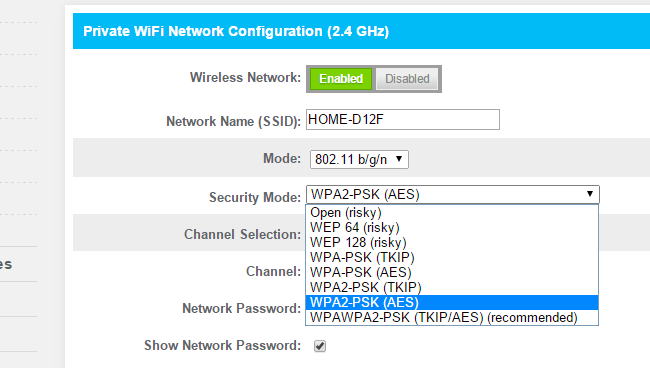
On our Comcast Xfinity router, WPA2-PSK (TKIP), WPA2-PSK (AES), and WPA2-PSK (TKIP/AES) are all different options. Choose the wrong option and you’ll have a slower, less-secure network.
The last option — both TKIP and AES — was the default on our router. That’s actually a bad choice, but just understanding the options requires some knowledge of Wi-Fi encryption standards.

AES vs. TKIP

encryption that can be used by a Wi-Fi network. TKIP stands for “Temporal Key Integrity Protocol.” It was a stopgap encryption protocol introduced with WPA to replace the very-insecure WEP encryption at the time. TKIP is actually quite similar to WEP encryption. TKIP is no longer considered secure, and is now deprecated. In other words, you shouldn’t be using it.
AES stands for “Advanced Encryption Standard.” This was a more secure encryption protocol introduced with WPA2, which replaced the interim WPA standard. AES isn’t some creaky standard developed specifically for Wi-Fi networks; it’s a serious worldwide encryption standard that’s even been adopted by the US government. For example, when you encrypt a hard drive with TrueCrypt, it can use AES encryption for that. AES is generally considered quite secure, and the main weaknesses would be brute-force attacks (prevented by using a strong passphrase) and security weaknesses in other aspects of WPA2.
The “PSK” in both names stands for “pre-shared key” — the pre-shared key is generally your encryption passphrase. This distinguishes it from WPA-Enterprise, which uses a RADIUS server to hand out unique keys on larger corporate or government Wi-Fi networks.

WPA Uses TKIP and WPA2 Uses AES, But…

In summary, TKIP is an older encryption standard used by the old WPA standard. AES is a newer Wi-Fi encryption solution used by the new-and-secure WPA2 standard. In theory, that’s the end of it. But, depending on your router, just choosing WPA2 may not be good enough.
While WPA2 is supposed to use AES for optimal security, it also has the option to use TKIP for backward compatibility with legacy devices. In such a state, devices that support WPA2 will connect with WPA2 and devices that support WPA will connect with WPA. So “WPA2” doesn’t always mean WPA2-AES. However, on devices without a visible “TKIP” or “AES” option, WPA2 is generally synonymous with WPA2-AES.

Wi-Fi Security Modes Explained


Confused yet? We’re not surprised. But all you really need to do is hunt down the one, most secure option in the list. For example, here are the options our Comcast Xfinity router provides:
  • Open (risky): Open Wi-Fi networks have no passphrase. You shouldn’t set up an open Wi-Fi network — seriously, you could have your door busted down by police.
  • WEP 64 (risky): The old WEP encryption standard is vulnerable and shouldn’t be used. Its name, which stands for “Wired Equivalent Privacy,” now seems like a joke.
  • WEP 128 (risky): WEP with a larger encryption key size isn’t really any better.
  • WPA-PSK (TKIP): This is basically the standard WPA, or WPA1, encryption. It’s been superseded and isn’t secure.
  • WPA-PSK (AES): This chooses the older WPA wireless protocol with the more modern AES encryption. Devices that support AES will almost always support WPA2, while devices that require WPA1 will almost never support AES encryption. This option makes very little sense.
  • WPA2-PSK (TKIP): This uses the modern WPA2 standard with older TKIP encryption. This isn’t secure, and is only a good idea if you have older devices that can’t connect to a WPA2-PSK (AES) network.
  • WPA2-PSK (AES): This is the most secure option. It uses WPA2, the latest Wi-Fi encryption standard, and the latest AES encryption protocol. You should be using this option. On devices with less confusing interfaces, the option marked “WPA2” or “WPA2-PSK” will probably just use AES, as that’s a common-sense choice.
  • WPAWPA2-PSK (TKIP/AES) (recommended): Our Comcast Xfinity router recommends this free-for-all option. This enables both WPA and WPA2 with both TKIP and AES. This provides maximum compatibility with any ancient devices you might have, but also ensures an attacker can breach your network by cracking the lowest-common-denominator encryption scheme. This TKIP+AES option may also be called WPA2-PSK “mixed” mode.

Devices Manufactured Since 2006 Must Support AES

WPA2 certification became available in 2004, ten years ago. In 2006, WPA2 certification became mandatory. Any device manufactured after 2006 with a “Wi-Fi” logo must support WPA2 enctyption. That’s now eight years ago!
Your Wi-Fi enabled devices are probably newer than 8-10 years old, so you should be fine just choosing WPA2-PSK (AES). Select that option and then you can see if anything doesn’t work. If a device does stop working, you can always change it back — although you may just want to buy a new device manufactured at any time in the last eight years.

WPA and TKIP Will Slow Your Wi-Fi Down


WPA and TKIP compatability options can also slow your Wi-Fi network down. Many modern Wi-Fi routers that support 802.11n and newer, faster standards will slow down to 54mbps if you enable WPA or TKIP in their options. They do this to ensure they’re compatible with these older devices.
In comaprison, even 802.11n supports up to 300mbps — but, generally, only if you’re using WPA2 with AES. Theoretically, 802.11ac offers theoretical maximum speeds of 3.46 Gbps under optimum (read: perfect) conditions.
In other words, WPA and TKIP will slow a modern Wi-Fi network down. It’s not all about security!
wifi logo

On most routers we’ve seen, the options are generally WEP, WPA (TKIP), and WPA2 (AES) — with perhaps a WPA (TKIP) + WPA2 (AES) compatibility mode thrown in for good measure.
If you do have an odd sort of router that offers WPA2 in either TKIP or AES flavors, choose AES. Almost all your devices will certainly work with it, and it’s faster and more secure. It’s an easy choice, as long as you can remember AES is the good one.