Tuesday, October 27, 2015

Dell Latitude Biometric Issue

 After installing the Dell ControlVault Firmware, then we have to re-install the Dell Data Protection Access.  After this, we can finally install the Dell ControlVault Driver. 


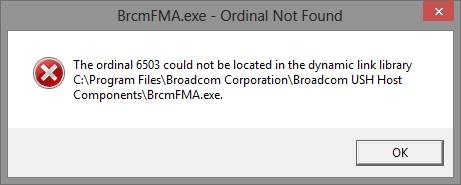
Some of the “fun” errors we had were “The original 6503 could not be located in the dynamic link library.” 
https://solutionsthroughit.files.wordpress.com/2013/05/clip_image0026.jpg

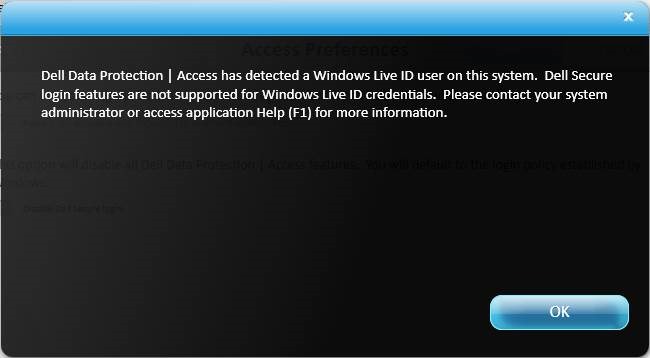
We couldn’t enable the fingerprint reader when there was a Microsoft Live account present.
https://solutionsthroughit.files.wordpress.com/2013/05/clip_image00210.jpg
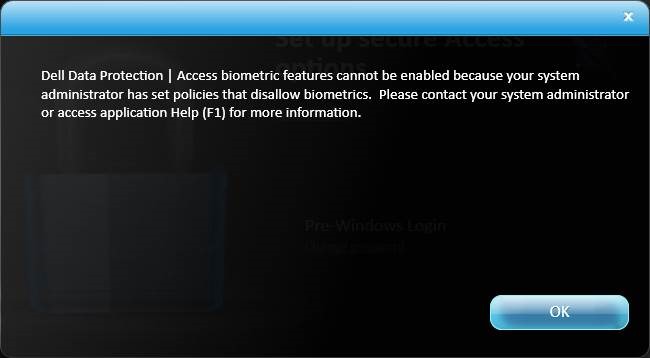
We also couldn’t setup the biometric – because the system administrator had set policies that disallow biometrics.
https://solutionsthroughit.files.wordpress.com/2013/05/clip_image00212.jpg


Resolution:

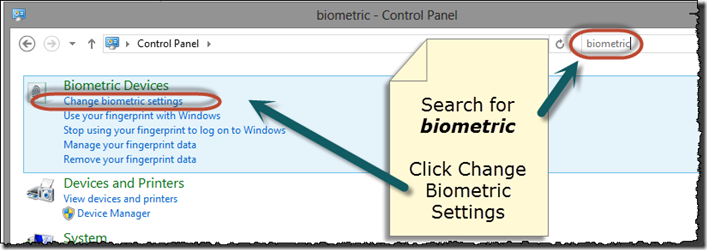
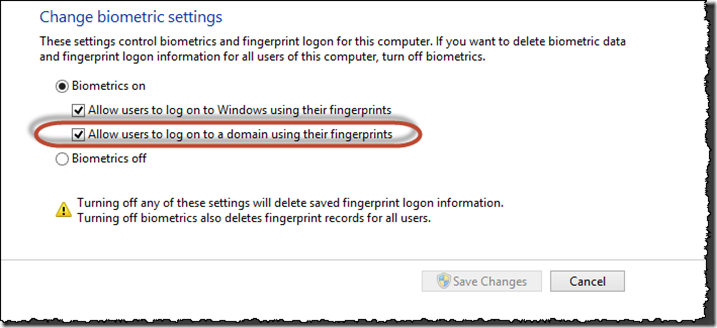
Open control panel, and search for biometric.  Click on Change Biometric Settings.
SNAGHTML11b1b2

Tick “Allow users to log on to a domain using their fingerprints”, and then Save Changes.
SNAGHTML1231f8

Tuesday, October 6, 2015

Hyper-V 2008: Troubleshooting Event ID 3112 "The virtual machine could not be started because the hypervisor is not running."

The virtual machine could not be started because the hypervisor is not running. Check your BIOS settings and BCD store, then restart the physical computer.
NOTE: You might also have seen the following error message when attempting to start the virtual machine.

Hyper-V requires hardware support, including: an x64 CPU; VT (Intel) or AMD-V (AMD) hardware extensions; No eXecute (NX)/eXecute Disable (XD) and full BIOS support for hardware virtualization. Check your physical computer's BIOS settings to ensure that virtualization features are enabled, and then turn off the power to your physical computer. Restart the physical machine. NOTE: Restarting the physical computer is not sufficient.

For HP Proliant Server, Press F9 then press F10 to BIOS setup. Then go to Advanced and Advanced Processor options.

Enable the Virtualization Technology and No Execute Mode Mem Protection.


Tuesday, September 29, 2015

Outlook: Reasons Why Recall Message May Fail

When will Recall actually work

Recall Success or Failure? buttonThere are several conditions which must be met for the Recall feature to work:

  • The first condition for Recall to work is that you must be using an Exchange account and the recipient must be within that same Exchange organization as well. In other words; When you are using a POP3, IMAP or Outlook.com account or when the recipient is located on the Internet, you are out of luck already.
  • The recipient must also be using Outlook to read his/her emails. When a message is being read via Outlook Web App (OWA) or via EAS on a smartphone or tablet, the recall will not work.
  • The recipient must have an active connection with Exchange. When Cached Exchange Mode is enabled and the recipient is working off-line, the recall process will fail.
  • The original message must arrive in the Inbox folder of the recipient. When it got moved via a rule, recalling the message is not possible.
  • The original message must still be unread and the recipient must open the Recall message before the original message.
Remedy:

Delay all message for few minutes

If you want all your messages to hang in your Outbox for a certain amount of time because something else always comes to mind when pressing the send button (how you can rephrase something, adding another attachment, etc…) you can create a rule that can defer sending of all your messages from 1 minute to 5 minutes..

Outlook 2010/2013 NK2 import not saving

I copied the .nk2 file from my old computer. However, the nickname auto complete features did not work after I reopen the Outlook.

I just got this to work, by typing this command from the Start button >> search bar.

outlook.exe /CleanAutoCompleteCache

Then, I renamed the .NK2.old file back to .NK2, and reimported it by opening Outlook with this command:

outlook.exe /importnk2

This time the nickname cache stayed put.

Hope this helps...

Unable to start service MSSQLSERVER on server (mscorlib)

screenshot


  • Run services.msc
  • Find the MSSQLSERVER Service.
  • Right click and open properties
  • Check what service account it is running under (usually NT AUTHORITY\SYSTEM, NT AUTHORITY\LOCAL SERVICE or NT AUTHORITY\NETWORK SERVICE 
  • For me, it was sorted out by switching from Network Service to Local Service.

Friday, September 25, 2015

How to use IP helper-address to connect remote DHCP server

"IP helper-address" command for broadcast applications suchIP-helper address to remote DHCP server as DHCP client(BOOTP), NetBIOS and so on. As you know IP helper-address is required a network is connected certain application at remote. For example, communicating between old computers that is using NetBIOS protocols, connecting remote DHCP server. In this article, we will mainly discuss about how to use IP helper-address to connect a remote DHCP server. The below example might not be realistic, b/c I just made up a case to better understand this technology.


[Configuration layout]

- As you can see below diagram, there are a DHCP server and two DHCP clients that one is in local and other is in remote. Where do you think the "IP helper-address" command needs to be inplace for DHCP client in remote? Answer is Ethernet interface of New York router. By default, router drop all the broadcast packtes sent thru the router. Because DHCP clients use bootp packets that are broadcasted to all hosts(255.255.255.255) and it will be all dropped by the router. The "ip helper-address" command makes the router to forward BOOTP broadcast packets to the specific remote DHCP server.

[New York Router]

version 12.4
service timestamps debug datetime msec
service timestamps log datetime msec
no service password-encryption
!
hostname New_York
!
boot-start-marker
boot-end-marker
!
no aaa new-model
memory-size iomem 5
!
ip cef
no ip domain lookup
!
ip auth-proxy max-nodata-conns 3
ip admission max-nodata-conns 3
!
interface FastEthernet0/0
no ip address
duplex auto
speed auto
!
interface FastEthernet0/1
no ip address
shutdown
duplex auto
speed auto
!
interface Serial1/0
no ip address
shutdown
serial restart-delay 0
!
interface Serial1/1
ip address 10.20.1.1 255.255.255.252
load-interval 30
serial restart-delay 0
!
interface Serial1/2
no ip address
load-interval 30
serial restart-delay 0
!
interface Serial1/3
no ip address
shutdown
serial restart-delay 0
!
interface FastEthernet2/0
ip address 100.100.100.129 255.255.255.128
ip helper-address 100.100.100.2 <--- font=""> Pointing to Remote DHCP Server
duplex auto
speed auto
!
router bgp 10
no synchronization
bgp log-neighbor-changes
network 100.100.100.128 mask 255.255.255.128
redistribute connected
neighbor 10.20.1.2 remote-as 20
neighbor 10.20.1.2 timers 3 20
no auto-summary
!
ip http server
no ip http secure-server
ip forward-protocol nd
!
control-plane
!
line con 0
exec-timeout 0 0
logging synchronous
line aux 0
line vty 0 4
login
!
end

[LA Router]

version 12.4
service timestamps debug datetime msec
service timestamps log datetime msec
no service password-encryption
!
hostname LA
!
boot-start-marker
boot-end-marker
!
no aaa new-model
memory-size iomem 5
!
ip cef
no ip domain lookup
!
ip auth-proxy max-nodata-conns 3
ip admission max-nodata-conns 3
!
interface FastEthernet0/0
no ip address
shutdown
duplex auto
speed auto
!
interface FastEthernet0/1
no ip address
shutdown
duplex auto
speed auto
!
interface Serial1/0
no ip address
shutdown
serial restart-delay 0
!
interface Serial1/1
ip address 10.20.1.2 255.255.255.252
load-interval 30
serial restart-delay 0
!
interface Serial1/2
no ip address
serial restart-delay 0
!
interface Serial1/3
no ip address
shutdown
serial restart-delay 0
!
interface FastEthernet2/0
ip address 100.100.100.1 255.255.255.0
duplex auto
speed auto
!
router bgp 20
no synchronization
bgp log-neighbor-changes
redistribute connected
neighbor 10.20.1.1 remote-as 10
no auto-summary
!
ip http server
no ip http secure-server
ip forward-protocol nd
!
control-plane
!
line con 0
exec-timeout 0 0
logging synchronous
line aux 0
line vty 0 4
login
!
end

[DHCP Server / mimic Cisco 3660]

version 12.4
service timestamps debug datetime msec
service timestamps log datetime msec
no service password-encryption
!
hostname DHCP_Server
!
boot-start-marker
boot-end-marker
!
no aaa new-model
memory-size iomem 5
!
ip cef
no ip domain lookup
no ip dhcp use vrf connected
ip dhcp excluded-address 100.100.100.0 100.100.100.129
!
ip dhcp pool dhcp_pool <--------- dhcp="" font="" name="" of="" pool="">
network 100.100.100.0 255.255.255.0 <---- client="" dhcp="" font="" for="" ip="" pool="">
default-router 100.100.100.129 <------------ br="" client="" default="" dhcp="" for="" route="">dns-server 4.2.2.1 <------------- be="" dns="" font="" info="" sent="" server="" will="">
!
ip auth-proxy max-nodata-conns 3
ip admission max-nodata-conns 3
!
interface FastEthernet0/0
ip address 100.100.100.2 255.255.255.0
duplex auto
speed auto
!
interface FastEthernet0/1
no ip address
shutdown
duplex auto
speed auto
!
ip http server
no ip http secure-server
ip forward-protocol nd
ip route 0.0.0.0 0.0.0.0 100.100.100.1
!
control-plane
!
line con 0
exec-timeout 0 0
logging synchronous
line aux 0
line vty 0 4
login
!
end

Monday, September 21, 2015

Deploying Java Runtime Enviroments with Local Update Publisher

  1. First downloaded the lattest offline installer from:
    http://java.com/en/download/manual.jsp details
  2. start the installer exe (don't click on any buttons once the installer has started though).
  3. go to c:\users\%username%\AppData\LocalLow\Sun\Java\[jre version]
  4. copy the *.cab and *.msi files to another folder that you can easilly access
  5. go into local update publisher, tools, create update
  6. for the update file choose the msi file that you previously coppied out
  7. Then click on add files, and add the .cab file you previously coppied out
  8. Click on add files again and add the following .mst file if you don't want java downloading updates from Oracle jre1.7.0_xx.mst details
To create your own mst file using InstEd, follow the instructions at: http://sourceforge.net/apps/mediawiki/localupdatepubl/index.php?title=Creating_Configuration_files_during_installation to import the vbscript at http://sourceforge.net/apps/mediawiki/localupdatepubl/index.php?title=Creating_WSUS_updates_for_Java into a mst file for the java msi file